What is a branded waiting room?
Lobbi is a branded waiting room for video calls: guests open one reusable link, see your brand and a personal welcome, then join your Google Meet, Zoom, or Microsoft Teams call when you admit them. It is not a website traffic queue and not a chatbot.
A branded waiting room is the page a guest sees before a video call starts, designed in your brand instead of your video tool’s. It welcomes the guest by name, shows who they’re about to meet, and gives them useful content while they wait, then sends them into the call when the host admits them.
The short answer
- A branded waiting room replaces the generic “waiting for host” screen in Google Meet, Zoom, or Microsoft Teams with a page that looks like your business.
- It typically includes your logo and colors, a personal welcome, a host card, and content such as a video, agenda, or case study.
- The host gets an alert when a guest arrives and admits them into the video call.
- It’s used before external calls where first impressions matter: sales demos, discovery calls, consultations, and client meetings.
How is it different from a Zoom, Meet, or Teams waiting room?
Video tools have built-in waiting rooms, but they’re designed for access control: holding people until the host lets them in. Customization is limited or locked behind paid tiers:
- Zoom lets account owners and admins customize the waiting room with a title of up to 64 characters, a logo, a description of up to 400 characters, and an image or video.
- Google Meet added waiting rooms in October 2025 on certain paid Workspace editions. Google’s documentation describes no branding options.
- Microsoft Teams can show a logo, brand image, and brand color on the lobby screen through meeting themes, which require a Teams Premium license.
A branded waiting room is a separate page that sits in front of the call. Because it isn’t limited by the video tool’s settings, it can carry your full design and richer content, and the same room works whether the call runs on Meet, Zoom, or Teams.
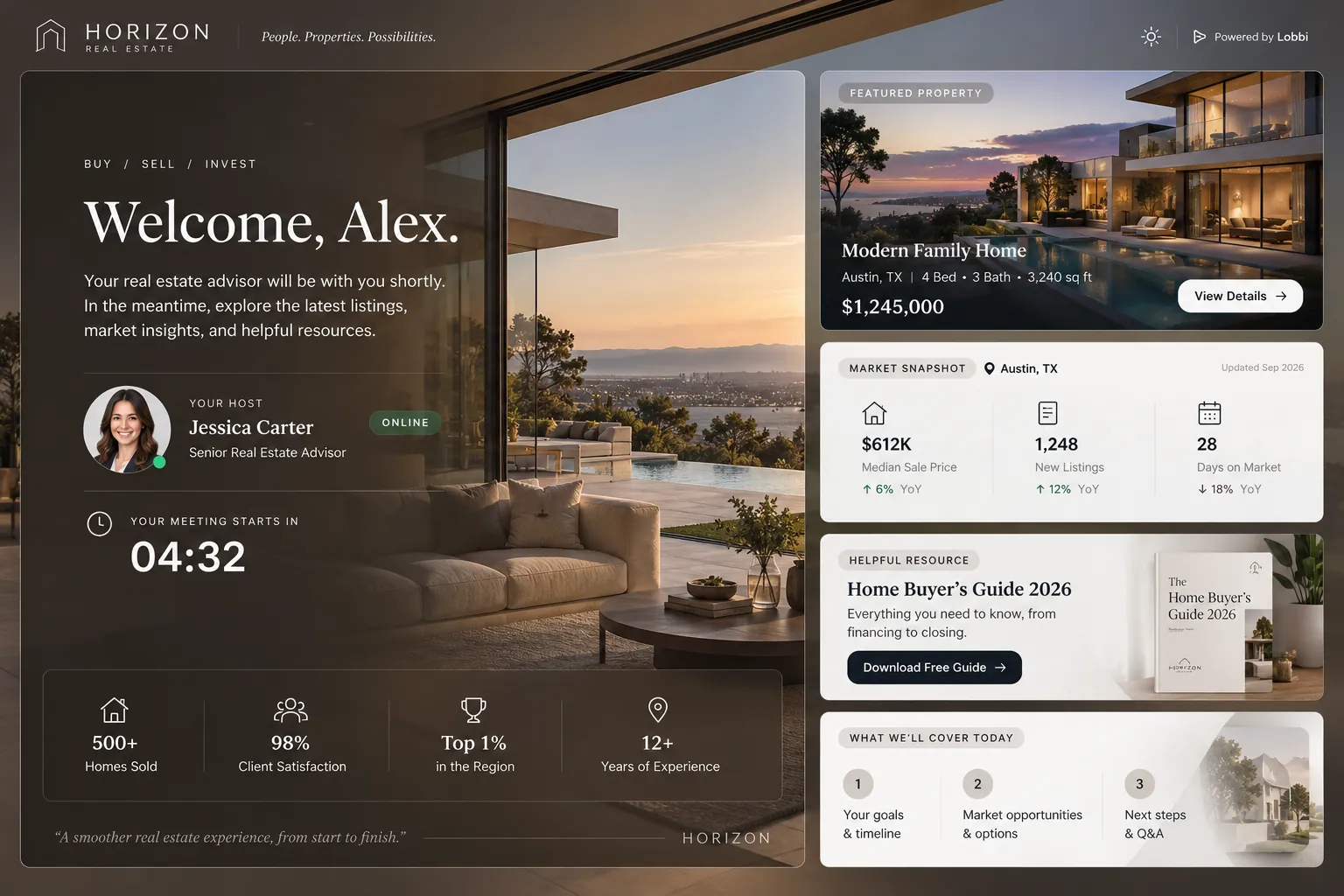
What goes in a branded waiting room?
| Element | What it does |
|---|---|
| Brand design | Logo, colors, typography, and imagery that match your website |
| Personal welcome | Greets the guest by name and names the call they’re joining |
| Host card | Shows the name, photo, and title of the person they’re meeting |
| Content | A short video, agenda, case study, featured offer, or useful links |
| Check-in | Optional questions such as name, email, phone, or a custom prompt |
| Status | Tells the guest they’re checked in, or that the host is running late |
| Join | Sends the guest into the video call when the host admits them |
Why use a branded waiting room?
- A better first impression. The first thing a prospect sees on a call is your brand, not a grey screen.
- Context before the conversation. Guests arrive knowing who they’re meeting and what you’ll cover.
- Fewer awkward waits. The host knows the moment a guest arrives, and the guest can see if the host is running late.
- Consistency across tools. One branded entrance in front of whichever video tool the call uses.
Who uses branded waiting rooms?
Anyone whose calls are part of how they win or keep business:
- Sales teams running demos
- Founders taking discovery calls
- Consultants and agencies meeting prospects and clients
- Real estate agents and financial advisors holding virtual consultations
Is a branded waiting room the same as a digital sales room?
No. A digital sales room is a shared portal for an entire deal, used asynchronously over weeks to share proposals, documents, and mutual action plans. A branded waiting room is for the live moment just before a call. The two complement each other. See Lobbi vs digital sales rooms.
How to create a branded waiting room with Lobbi
- Paste your website URL. Lobbi’s AI pulls in your logo, colors, imagery, and messaging and builds four branded room designs.
- Pick a design and add your content for this kind of call.
- Connect your meeting. Connect Google Meet once, or add the Zoom or Teams link you want guests to join.
- Share the lobby link in invites, your booking page, or your email signature. It works for unlimited meetings.
- Admit guests when you get the alert in Lobbi, by email, or in Slack.
Frequently asked questions
Does the guest need to install anything?
No. A branded waiting room opens in the guest’s browser, with no account or download.
Does the video call happen in the waiting room?
Not with Lobbi. The waiting room handles the welcome and the wait, and the call runs in Google Meet, Zoom, or Teams.
Can I have different rooms for different calls?
Yes. Create a separate lobby for each call type, client, or brand. Each has its own permanent link.
Is Lobbi free?
Yes. The free plan includes two branded waiting rooms, you and one teammate, waiting room design and customization, Google Meet, and Slack notifications, with no card required. See pricing.
Replace the grey screen with your brand.
Build a branded waiting room from your website in a few minutes.