A branded virtual waiting room for real estate agents
Buyers and sellers choose an agent they trust. Lobbi helps you earn that before the video call starts: a personal welcome from you, a featured property, the agenda for the consultation, and a guide they can read while they wait.
The short answer
- Lobbi puts a branded waiting room in front of your virtual consultations and video tours.
- Clients see your welcome, a featured listing, the meeting agenda, and a buyer or seller guide.
- You get an alert when they arrive and admit them into Google Meet, Zoom, or Teams.
- One permanent link works for every consultation and fits in your email signature or booking page.
Why give clients a waiting room before a video consultation?
For many buyers, a video consultation is the first real conversation with an agent. A branded room that shows your face, your market, and a property they might love sets the tone for the relationship. It also gives early arrivals something useful to do instead of watching a blank screen.
What to put in a real estate waiting room
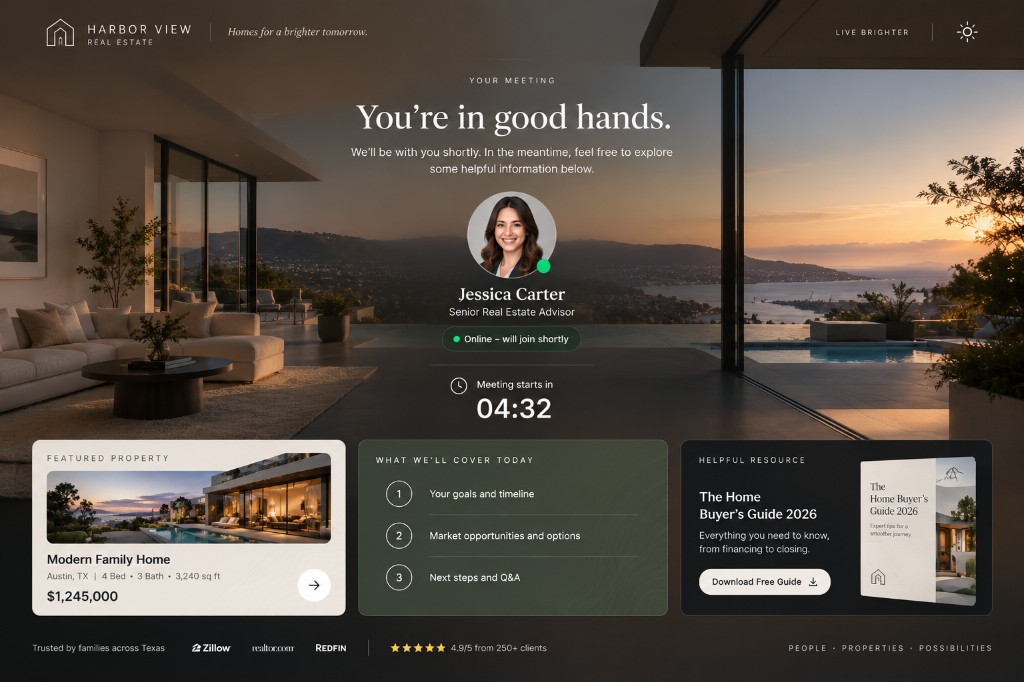
The Harbor View example on our homepage is built for an independent agent before a client consultation:
- A personal welcome from the agent. Your photo, name, and title on the host card, and a greeting with the client’s name.
- A featured property and meeting agenda. A listing worth a look, plus what you’ll cover on the call.
- A buyer guide and helpful resources. Links to your guide, market reports, or mortgage calculators.
Lobbies for different conversations
| Waiting room | Best for | Content |
|---|---|---|
| Buyer consultation | First calls with buyers | Featured homes, buyer guide, and agenda |
| Listing presentation | Calls with potential sellers | Recent sales, your marketing approach, and agenda |
| Virtual tour | Showing a property by video | The listing details and neighborhood links |
The free plan includes two lobbies, each with its own permanent link.
Know who’s waiting
Turn on check-in to ask for a name, email, and phone number, plus one question of your own, such as “Which neighborhoods are you considering?” Lobbi notifies you in the dashboard, by email, or in Slack when someone checks in. If you’re finishing a showing, a running-late message lets them know you’re on your way.
How to set up your waiting room
- Paste your website URL. Lobbi’s AI pulls in your logo, colors, imagery, and messaging and builds four branded room designs.
- Pick a design and add your content for this kind of call.
- Connect your meeting. Connect Google Meet once, or add the Zoom or Teams link you want guests to join.
- Share the lobby link in invites, your booking page, or your email signature. It works for unlimited meetings.
- Admit guests when you get the alert in Lobbi, by email, or in Slack.
Frequently asked questions
Do clients need an app?
No. The lobby opens in any browser on a phone or computer, with no account or download.
Can I change the featured property each week?
Yes. Update the content whenever you like. The link stays the same, so links you’ve already sent keep working.
Which video tools does it work with?
Google Meet connects directly and creates a meeting link when you admit a guest. For Zoom or Teams, add your meeting link to the lobby and Lobbi sends guests to it.
Is it free?
Yes. The free plan includes two branded waiting rooms, you and one teammate, waiting room design and customization, Google Meet, and Slack notifications, with no card required. See pricing.
Make every consultation feel like a private showing.
Build a branded waiting room from your website in a few minutes.