A branded waiting room for sales demos
A demo starts before you share your screen. Prospects who arrive early sit on a grey video-call screen, wondering if they have the right link. Lobbi turns those minutes into the first part of the demo: your brand, your product story, proof from customers like them, and the agenda for the call.
The short answer
- Lobbi gives your demo link a branded waiting room built from your website in a few minutes.
- Prospects see a personal welcome, the rep they’re meeting, a quick product tour, customer proof, and the agenda.
- Reps get an alert the moment a prospect checks in, and admit them into Google Meet, Zoom, or Teams with one tap.
- One permanent link works for every demo, so it fits straight into Calendly, Cal.com, or HubSpot.
Why do the minutes before a demo matter?
By the time a demo starts, the prospect has usually forgotten part of why they booked. If the rep is a minute or two late, the prospect waits on a screen that says nothing about your company. That’s a weak start for a call meant to show your product at its best.
A demo waiting room does three jobs in that gap. It confirms the prospect is in the right place. It reminds them what problem you solve and who you’ve solved it for. And it tells your rep they’ve arrived, so nobody sits alone on a call.
What to put in a sales demo waiting room
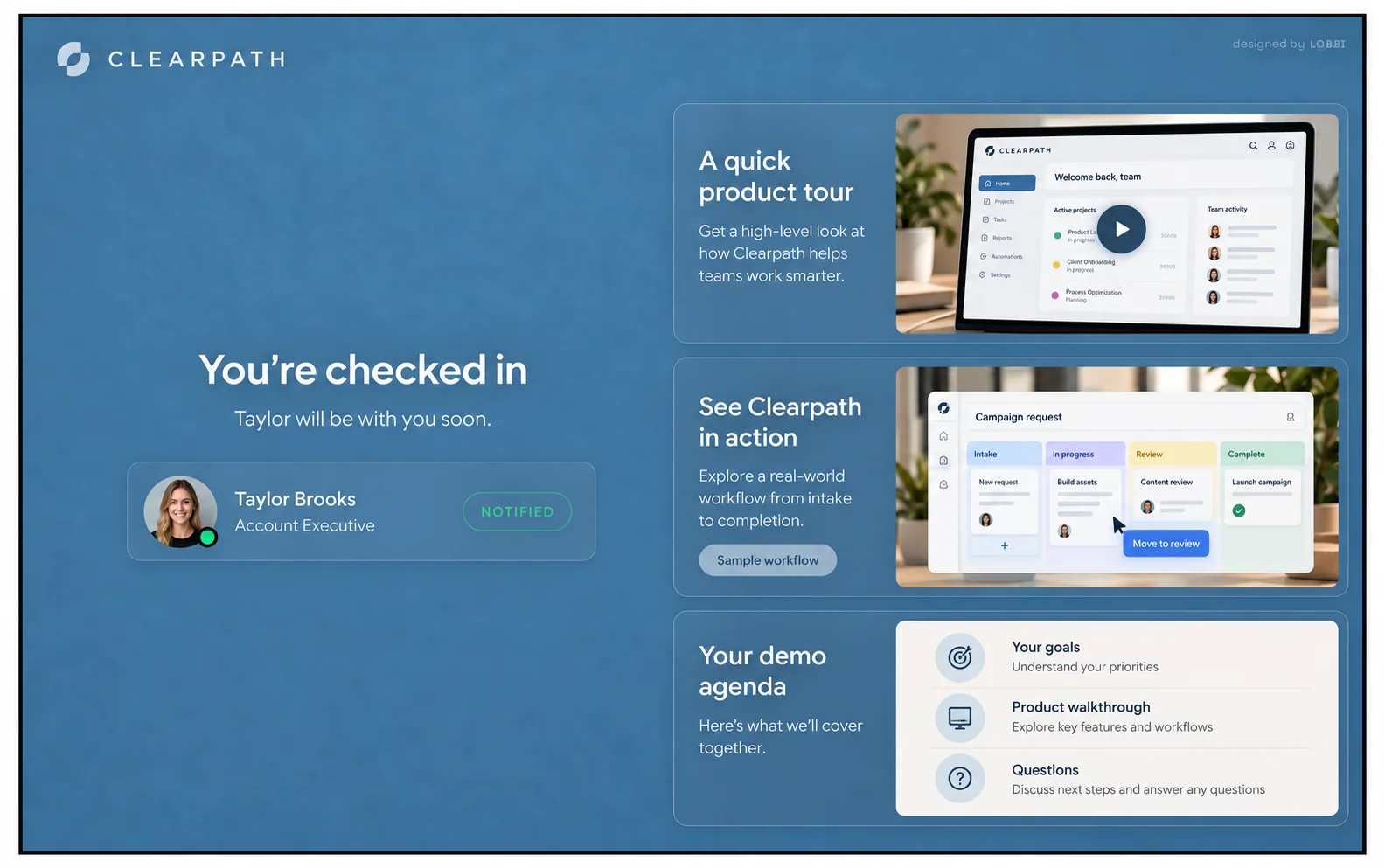
The example Clearpath lobby on our homepage uses three blocks, and they make a good starting point:
- Your colors and product story. A headline and short line that frame the problem in your prospect’s words.
- A quick tour and relevant customer proof. A short product video and a case study from a similar company or industry.
- An agenda for the demo ahead. Three or four points so the prospect knows what they’ll see and can think about questions.
The host card shows the rep’s name, photo, and title, so the prospect knows who is about to join.
How sales teams use Lobbi
| Moment | Without a waiting room | With Lobbi |
|---|---|---|
| Prospect arrives early | Grey “waiting for host” screen | Branded welcome, tour, and proof |
| Rep finds out | Only when they join the call | Alert in Lobbi, by email, or in Slack |
| Rep is running late | Prospect has no idea | A running-late message appears in the room |
| Rep learns about the prospect | Booking form only | Optional check-in: name, email, phone, and your own question |
| Joining the call | Separate link in the invite | Admit with one tap; Lobbi opens the meeting |
How to set up a demo waiting room
- Paste your website URL. Lobbi’s AI pulls in your logo, colors, imagery, and messaging and builds four branded room designs.
- Pick a design and add your content for this kind of call.
- Connect your meeting. Connect Google Meet once, or add the Zoom or Teams link you want guests to join.
- Share the lobby link in invites, your booking page, or your email signature. It works for unlimited meetings.
- Admit guests when you get the alert in Lobbi, by email, or in Slack.
Running several demo types? Create a separate lobby for each, such as a core product demo and an enterprise demo, each with its own link and content.
Frequently asked questions
Will prospects need to download anything?
No. The lobby opens in any browser, and no account is needed to wait. The call itself runs in your usual video tool.
Can I ask a qualifying question before the demo?
Yes. Check-in can ask for name, email, and phone, plus one question of your own, such as “What would make this demo a success for you?” Check-in is optional, so you can turn it off for a frictionless entry.
Does it work with our booking tool?
Yes. Paste the lobby link as the meeting location in Calendly, Cal.com, or HubSpot Meetings. See the Calendly setup guide.
Is it free?
Yes. The free plan includes two branded waiting rooms, you and one teammate, waiting room design and customization, Google Meet, and Slack notifications, with no card required. See pricing.
Make the first minute part of the demo.
Build a branded demo lobby from your website in a few minutes.