A branded waiting room for agency client calls
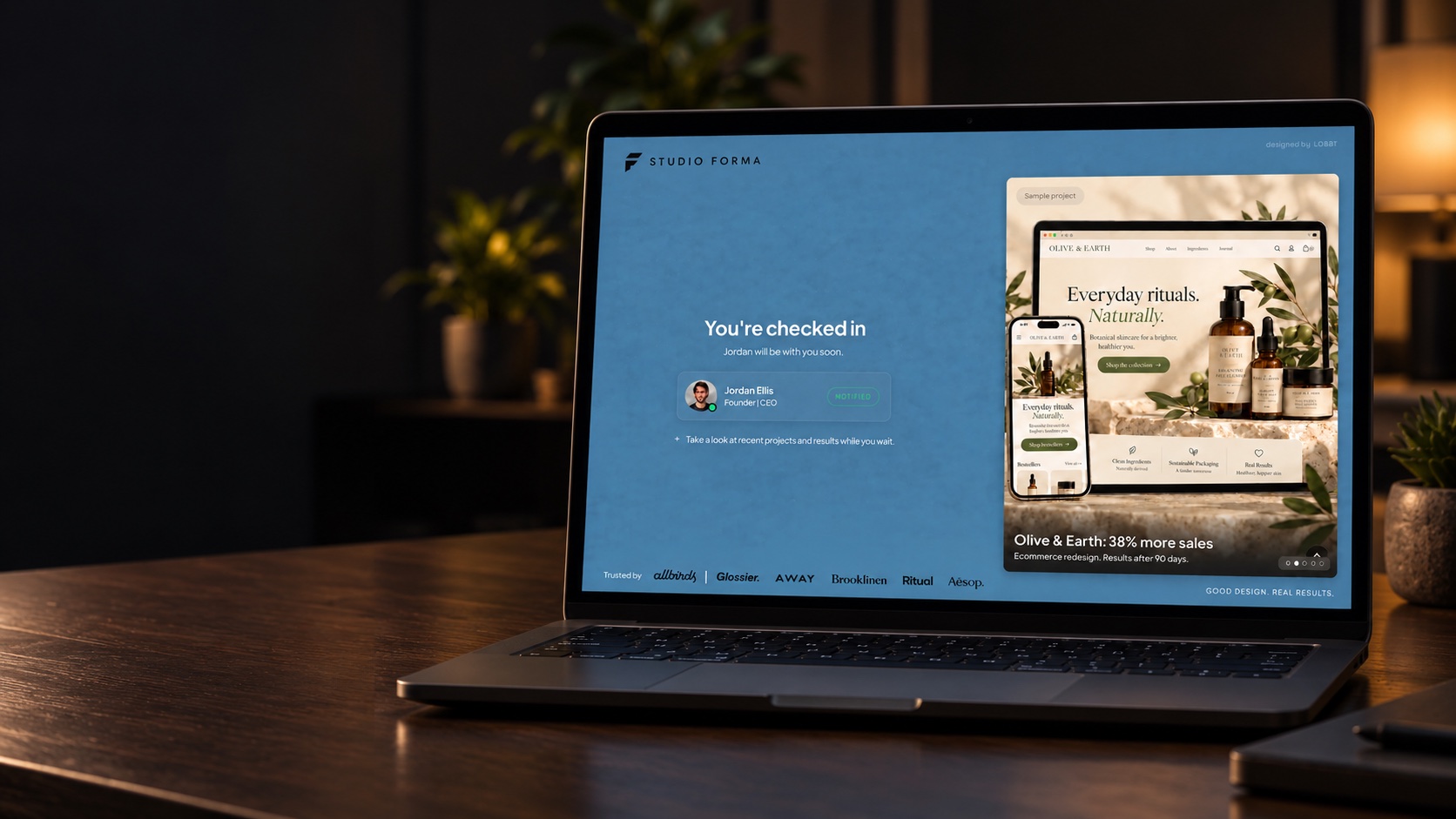
Agencies sell taste. It’s odd, then, that most agency calls start on the same grey video screen as everyone else’s. Lobbi gives new-business calls and client check-ins a waiting room that shows your work, introduces your team, and sets the agenda before anyone joins.
The short answer
- Lobbi turns your meeting link into a branded room that shows off your work while prospects and clients wait.
- Create a lobby per call type, such as new business and client check-ins, each with its own permanent link.
- Prospects see your work, the person they’re meeting, and the agenda. You get an alert when they arrive.
- It works with Google Meet, Zoom, and Microsoft Teams.
Why should an agency brand its waiting room?
For a prospect comparing agencies, the details are the evidence. A branded room that looks like your studio, with a project worth clicking, tells them more about your standards than a credentials deck. For existing clients, it turns every check-in into a reminder of the work you’re doing together.
What to put in an agency waiting room
- A welcome in your studio’s voice. The guest’s name and one line about the call ahead.
- Selected work. A featured project or case study relevant to the prospect’s industry.
- Your team. The host card shows who they’re meeting, with a name, photo, and title.
- The agenda. What you’ll cover, so the call starts with focus.
Rooms an agency typically runs
| Waiting room | Purpose | Content |
|---|---|---|
| New business | First calls with prospects | Selected work, team, and agenda |
| Client check-ins | Regular calls with existing clients | Agenda and links to the latest work |
| Kickoff | Starting a new engagement | Welcome, team intros, and next steps |
Lobbi’s free plan includes two lobbies, and you can invite one teammate. Lobbi Pro, with more room for growing teams, is coming soon.
You don’t have to design it from scratch
Paste your website URL and Lobbi’s AI pulls in your logo, colors, imagery, and messaging to build four room designs. Pick the one closest to your studio, then adjust the content. You can change it any time without changing the link you’ve shared.
How to set up an agency waiting room
- Paste your website URL. Lobbi’s AI pulls in your logo, colors, imagery, and messaging and builds four branded room designs.
- Pick a design and add your content for this kind of call.
- Connect your meeting. Connect Google Meet once, or add the Zoom or Teams link you want guests to join.
- Share the lobby link in invites, your booking page, or your email signature. It works for unlimited meetings.
- Admit guests when you get the alert in Lobbi, by email, or in Slack.
Frequently asked questions
Can I make a room that looks like a client’s brand?
Yes. A lobby is built from whatever website URL you paste, so you can create a room in your own brand or one styled for a specific client or project.
Can the whole team get alerts?
Connect Slack and Lobbi posts each check-in to a channel you choose. Anyone in that channel can admit the guest, mark you as running late, or remove them. See Lobbi for Slack.
Does the call happen in Lobbi?
No. Lobbi handles the welcome and the wait; the call runs in Google Meet, Zoom, or Teams.
Is it free?
Yes. The free plan includes two branded waiting rooms, you and one teammate, waiting room design and customization, Google Meet, and Slack notifications, with no card required. See pricing.
Let your work speak before you do.
Build a branded agency lobby from your website in a few minutes.