A branded waiting room for discovery calls
A discovery call is often the first time a prospect meets you face to face. Lobbi lets that first impression start before the call: a welcome addressed to them, a short video from you, and one question that gets them thinking about what they need.
The short answer
- Lobbi puts a branded waiting room in front of your discovery call link.
- Prospects see a personal welcome, a founder or rep video, a product snapshot, and a question to start the conversation.
- Optional check-in collects name, email, phone, and one question of your own before they wait.
- You’re notified when they arrive and admit them into Google Meet, Zoom, or Teams.
What makes a discovery call go well from the first minute?
Good discovery calls feel like a conversation, not an interrogation. That’s easier when the prospect arrives already knowing who you are, what you do, and what you’re going to ask about. A plain video-call lobby gives them none of that. A branded waiting room gives them context while they wait, and gives you a head start on the conversation.
What to put in a discovery call waiting room
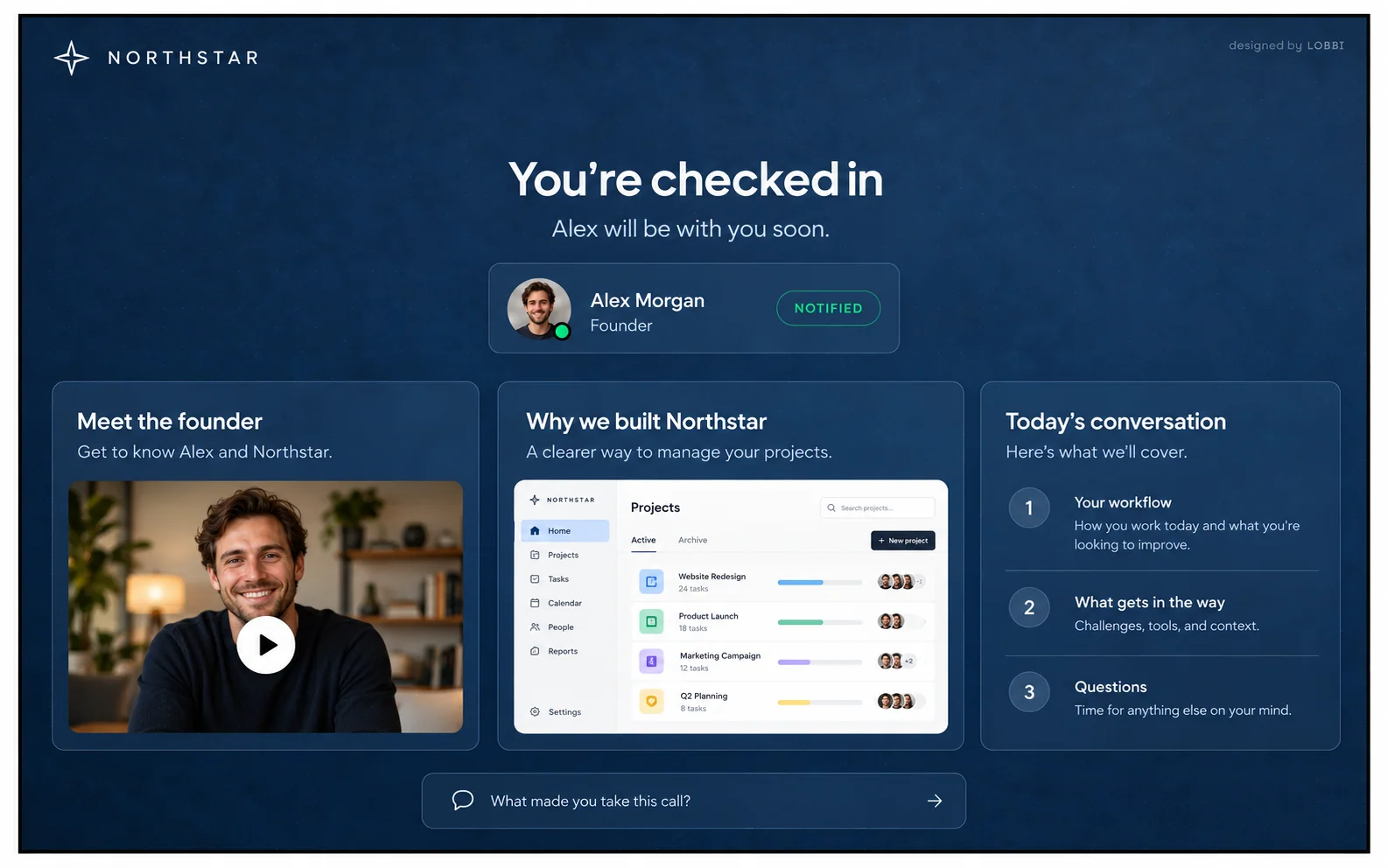
The Northstar example on our homepage is built for a founder taking discovery calls. It uses three blocks:
- Northstar’s look and a personal welcome. The guest’s name in the greeting, your brand everywhere else.
- A founder video and product snapshot. A minute or two on why you built it and what it does.
- A question to start the conversation. Something like “What’s the one thing you’d change about how your team does this today?”
Use check-in to prepare, not to qualify
Lobbi’s check-in is optional. If you turn it on, guests can enter their name, email, and phone, and answer one question you choose. For discovery calls, use that question to learn something you’d otherwise spend the first five minutes asking, such as their role or the problem that made them book.
If you already know who’s coming, add their name and email to the end of your lobby link (?name=…&email=…). With auto check-in on, they skip the form entirely.
Why founders use a waiting room for discovery calls
- It makes a small company look established. A branded room signals care before you’ve said a word.
- It covers back-to-back calls. If your last call runs over, the prospect sees a running-late message instead of an empty screen, and can explore your content while they wait.
- It’s one link. Put it in your Calendly event, your email signature, or a cold email, and reuse it for every call.
How to set up a discovery call waiting room
- Paste your website URL. Lobbi’s AI pulls in your logo, colors, imagery, and messaging and builds four branded room designs.
- Pick a design and add your content for this kind of call.
- Connect your meeting. Connect Google Meet once, or add the Zoom or Teams link you want guests to join.
- Share the lobby link in invites, your booking page, or your email signature. It works for unlimited meetings.
- Admit guests when you get the alert in Lobbi, by email, or in Slack.
Frequently asked questions
Can guests let themselves in if I’m very late?
Yes. You can let guests admit themselves after a wait you choose, from 1 to 120 minutes, so a prospect is never stuck if you’re delayed.
Do I need to design the room myself?
No. Paste your website URL and Lobbi’s AI builds four designs from your branding. Pick one and adjust the content.
Does the call happen inside Lobbi?
No. Lobbi handles the welcome and the wait, and the call runs in Google Meet, Zoom, or Teams.
Is it free?
Yes. The free plan includes two branded waiting rooms, you and one teammate, waiting room design and customization, Google Meet, and Slack notifications, with no card required. See pricing.
Start the conversation before the call.
Build a discovery call lobby from your website in a few minutes.